
The Real Role of Sales Intelligence Tools in 2026
Sales intelligence tools give sales teams real-time, prioritized signals that turn scattered prospect data into higher-quality leads, faster qualification, and more closed deals. That’s the bottom line. If your reps are still cold-calling off static lists or manually researching accounts before every outreach, you’re leaving pipeline on the table.
Here’s what teams that use sales intelligence software consistently see:
The sections below unpack how these tools work mechanically, which vendors lead in specific categories, how to run a pilot, and how to measure what you’re getting.
Sales intelligence is the practice of aggregating external and behavioral data about prospects and accounts, then surfacing that data as prioritized, actionable signals inside a seller’s workflow. A tight definition: it’s the layer between raw market data and the rep’s next action.
Your CRM stores what already happened: calls logged, deals created, contacts added. Sales intelligence tells you what’s happening right now in the market. A prospect just posted three DevOps engineer jobs. A target account raised a Series B. A competitor’s contract is up for renewal. None of that lives in your CRM by default.
Sales intelligence converts external market signals into seller-ready context, so reps spend less time researching and more time having conversations that actually move deals forward.
Revenue intelligence is a related but distinct concept. It analyzes your existing pipeline and conversation data to forecast outcomes and flag deal risk. Sales intelligence focuses upstream: finding and qualifying the right accounts before they’re in the pipeline. The three layers work together, but they’re not interchangeable. A rep using CRM data alone knows who they called last week. Add sales intelligence, and they know who to call tomorrow and why.
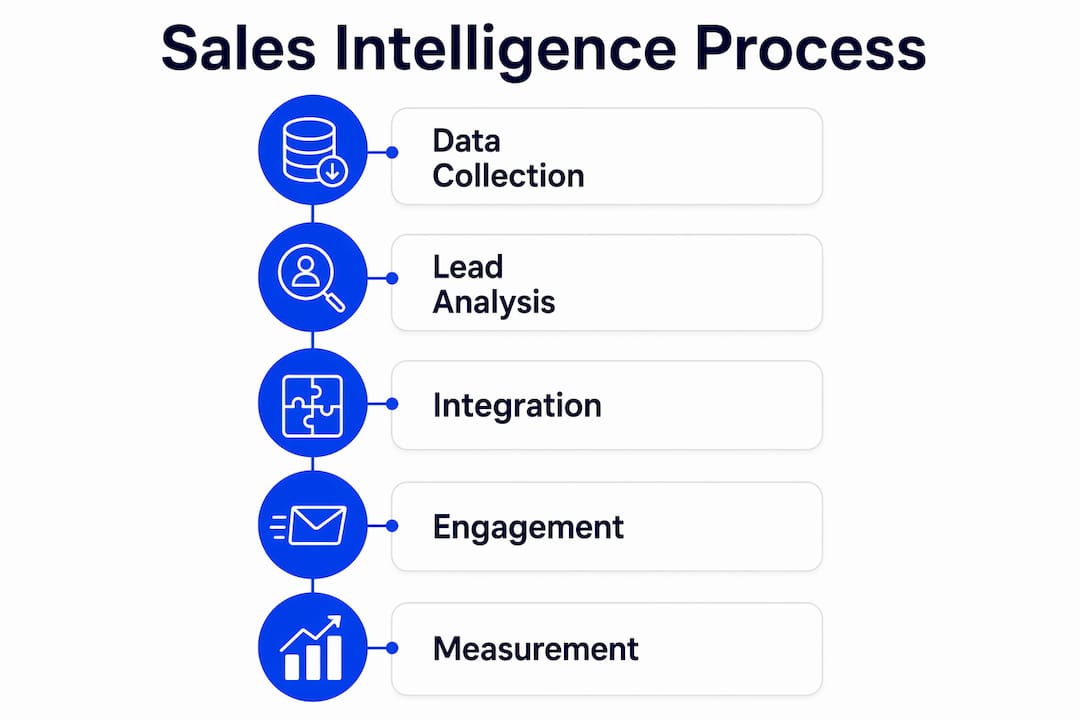
The core problem in most B2B sales orgs is signal-to-noise ratio. Reps have too many accounts to work and too little context on which ones are actually ready to buy. Sales intelligence fixes that by surfacing buying signals before a rep invests time in an account.
The primary business benefits break down like this:
The KPIs that move when intelligence is working: conversion rate from MQL to SQL, time-to-first-contact, average deal cycle time, and pipeline velocity. Many sales leaders also track CRM data completeness as a proxy for enrichment quality.
One adoption trap worth naming: more data doesn’t automatically mean better decisions. Teams that dump every available signal into a rep’s view without a clear prioritization model create noise, not clarity. The signal has to be filtered and ranked before it reaches the rep. That’s where scoring and playbooks come in, which we’ll cover in the features section.

Sales enablement trends in 2026 show that the highest-performing teams combine intelligence tools with explicit process design, not just software access.
The quality of any sales intelligence platform is only as good as its data sources. Here’s what feeds these systems:
Freshness matters enormously. A static database refreshed quarterly is nearly useless for fast-moving markets. News API feeds update in hours; intent data typically refreshes weekly; firmographic records can lag by months if a vendor isn’t actively re-verifying.
Pro Tip: When evaluating a vendor, ask two specific questions: “What is your median data age at the point a record is surfaced to a rep?” and “How do you handle records that fail re-verification?” A vendor that can’t answer both clearly is selling you a static database with a fresh coat of paint.
Privacy and compliance aren’t afterthoughts here. Any platform processing contact data in the US must align with applicable state privacy laws (CCPA in California, for example), and enterprise buyers should confirm GDPR compliance for any EU-facing outreach.
The functional architecture of a sales intelligence platform typically includes several interconnected layers. Understanding them helps you evaluate what you’re actually buying.
Core feature set:
The workflow that actually drives results looks like this:
The embedded vs. separate dashboard question is critical for adoption. Embedding insights inside the CRM or email client removes the friction of switching tools. When reps have to log into a separate platform to check signals, most won’t do it consistently. The intelligence has to meet them where they already work.

Sales intelligence isn’t a single-use tool. The highest-impact applications span the full sales cycle.
Targeted prospecting: A rep building a territory plan uses intent data and ICP filters to identify 50 accounts actively researching a relevant topic, rather than working a static list of 500. Outreach volume drops; reply rates climb.
Lead prioritization and handoff: Marketing passes 200 MQLs to sales. Without intelligence, reps work them in the order they arrived. With scoring, the 18 accounts showing high intent and strong ICP fit get called within the hour. The rest get sequenced by tier.
Account-based plays: An ABM team uses technographic data to identify accounts running a competitor’s product with a contract renewal window in the next 90 days. That’s a defined play, not a spray-and-pray campaign.
Conversation preparation: Before a discovery call, a rep pulls the account’s recent news, hiring trends, and technology profile. The call opens with context, not generic questions. Consultative selling becomes the default, not the exception.
Churn detection and expansion signals: Conversation intelligence flags a drop in engagement frequency or a shift in sentiment from a key contact. The customer success team gets an alert before the renewal conversation turns adversarial.
For SMB sales motions, the highest-value use cases are prospecting speed and lead prioritization. Enterprise teams get more from ABM activation, conversation intelligence, and multi-threaded account mapping. The tool set overlaps; the playbook differs.
This isn’t a definitive ranking. Think of it as a starting point for trials and pilots. Every team’s ICP, tech stack, and motion is different, so what works for a 10-rep SMB team won’t necessarily fit a 200-rep enterprise org.
The shortlist above spans four categories: enterprise data platforms (ZoomInfo), intent specialists (Bombora), conversation intelligence hybrids (Dialpad, Outreach, SiftHub), and enablement-adjacent tools (Highspot, Drift). Run a two-to-four week pilot with your actual ICP data before committing to any contract.
The selection process matters as much as the tool. Here’s a practical checklist:
Ten vendor questions to ask during a demo:
On pricing: most platforms use seat-based licensing at the rep level, with add-on credits for enrichment API calls or intent data access. SMB teams can often start with self-serve tiers. Enterprise contracts typically bundle data credits, dedicated support, and custom integrations. Expect significant variation between vendors, and always negotiate on data credit limits before signing.
Evaluating data provenance and integration depth as primary criteria is the consistent advice from practitioners who’ve run these selections before. Don’t let a slick demo distract from those fundamentals.
Technical adoption and process adoption are two different things. Teams often have the data available but fail to act consistently without explicit playbooks that translate specific signals into defined seller actions. That gap is where most implementations stall.
Here’s a realistic pilot structure:
| Week | Activity | Expected Output |
|---|---|---|
| 1–2 | ICP definition, CRM audit, vendor data sample validation | Confirmed data coverage for target accounts; baseline metrics captured |
| 3–4 | Integration setup, enrichment run on existing records, rep training | CRM records enriched; reps trained on signal interpretation |
| 5–6 | Live prospecting using scored accounts; playbook activation (if X signal, then Y action) | First outreach sequences running on intelligence-prioritized accounts |
| 7–8 | KPI review: reply rates, conversion lift, time-to-first-contact, CRM hygiene scores | Go/no-go decision on full rollout with documented lift data |
KPIs to track from day one:
Measure weekly during the pilot, monthly after full rollout. Adoption is not a one-time setup but a continuous improvement process. Build a governance cadence: a monthly review of signal quality, a quarterly review of ICP criteria, and an ongoing feedback loop from reps on which signals actually convert.
Combining third-party intent signals with first-party conversation and CRM signals produces more reliable lead prioritization than using external intent alone. That’s a practitioner reality, not a vendor claim. Your own deal history is the best training data for what “ready to buy” looks like in your market.
For teams tracking sales enablement metrics as part of a broader revenue operations framework, intelligence tool KPIs should roll up into the same dashboard as enablement and pipeline metrics. Siloed measurement creates siloed behavior.
Sales intelligence tools improve prospecting, qualification, and pipeline velocity when paired with explicit playbooks, embedded CRM workflows, and a structured pilot that validates data quality before full rollout.
| Point | Details |
|---|---|
| Embed intelligence in existing tools | Insights inside CRM or email drive consistent rep usage; separate dashboards get ignored. |
| Combine intent signals with first-party data | Third-party intent alone is noisy; pairing it with your own CRM and conversation signals sharpens prioritization. |
| Run a structured 2–8 week pilot | Validate data coverage, measure lift on conversion and time-to-first-contact before committing to enterprise contracts. |
| Measure process adoption, not just access | Track weekly signal-to-action rates; reps with data but no playbook don’t perform differently than reps without it. |
| Saleslabelconsulting as implementation partner | Saleslabelconsulting designs the playbooks, KPI governance, and pilot structure that turn tool access into measurable pipeline lift. |
Here’s the honest version of what we see when teams adopt sales intelligence tools without a process framework: the platform gets licensed, the CRM integration gets set up, and then… reps use it the same way they used their old list. They check it occasionally, pull a contact when they need one, and ignore the intent signals because nobody told them what to do when a signal fires.
The tools aren’t the problem. The playbook gap is.
High-performing teams treat sales intelligence as an operating system, not a database. They define explicit “if X signal, then Y action” rules before the platform goes live. A funding alert fires? The rep sends a specific message referencing the round within 24 hours. A target account spikes on intent? The account gets moved to the top of the sequence queue that day. That level of specificity is what separates teams that see measurable lift from teams that renew the contract and wonder why nothing changed.
The second thing high performers do differently: they measure signal-to-action rate as a first-class KPI. Not just “did the rep log in?” but “did the rep act on the signal within the defined window?” That metric exposes the real adoption gap faster than any other.
The third thing, and this one surprises people: they don’t try to use every feature on day one. The teams that get the fastest ROI pick one use case (usually intent-driven prospecting or trigger-based outreach), nail the playbook for that use case, prove the lift, and then expand. Trying to activate enrichment, intent, conversation intelligence, and ABM plays simultaneously in the first quarter is a recipe for confused reps and muddy data.
Real talk: the technology is the easy part. The hard part is getting 20 reps to change how they start their day.
Most teams that invest in sales intelligence software get the tool right and the process wrong. Saleslabelconsulting works with B2B tech and IT sales teams to close that gap, designing the playbooks, KPI frameworks, and pilot structures that make intelligence tools actually produce pipeline lift, not just licensed seats.
Here’s what a typical engagement looks like in practice:
If you’re evaluating tools now or already have a platform that isn’t delivering, a sales enablement engagement with Saleslabelconsulting is the fastest way to get from licensed to productive. Book a discovery call to map your current state and define a pilot scope that fits your team size and motion.
These are the most useful references for teams going deeper on sales intelligence selection, adoption, and measurement:
Subscribe to our Insights: Expert productivity tips in your inbox
You'll receive 1-3 emails per month. Your data stays private, always.

CRO & Co-Founder with Sales Label Consulting

Watch our Sales Mates Podcast
August 26, 2026 - 9 min read
Read article Read articleAugust 25, 2026 - 8 min read
Read article Read articleAugust 24, 2026 - 8 min read
Read article Read articleAugust 23, 2026 - 11 min read
Read article Read article