
Lead Routing Rules for Sales Ops: Setup & Best Practices
Well-designed lead routing rules assign every incoming lead to the right owner or queue within seconds, write the owner field, fire a rep notification, and leave an audit trail. That’s the entire job. If your current setup does all four reliably, you’re in good shape. If it doesn’t, the checklist below is your starting point.
Quick-start checklist:
Immediate next steps:
Well-designed lead routing rules assign every lead to the right owner within seconds, write the owner field, fire a notification, and leave an audit trail — and those four outcomes require correct rule order, a monitored fallback queue, clean criteria data, and a tested governance cadence.
| Point | Details |
|---|---|
| Specific rules first | Order entries from most specific to most general; the catch-all fallback belongs at the bottom with the highest sequence number. |
| Fallback must be a queue | Route unmatched leads to a monitored queue, never to an individual user or system admin. |
| Test every rule path | Build a test matrix with one case per rule entry plus negative tests for blank fields; re-run it after every change. |
| Track three health metrics | Monitor time-to-first-contact, percent routed to fallback, and leads owned by inactive users to enforce SLAs. |
| Saleslabelconsulting routing audit | A fixed-scope engagement delivers a documented logic map, test matrix, fail-safe automation, and a one-quarter governance plan. |
Prerequisites break more routing setups than bad logic does. Get these right first.
Permissions and access
You need admin-level access to create or edit assignment rules, modify page layouts, and manage queues. In Salesforce, that means the “Customize Application” permission. In Dynamics 365, you need the System Administrator or System Customizer role. Confirm this before you open the configuration screen.
Ownership model decision
Write this down before you touch the CRM. Three options:
For teams larger than five reps, queue-based routing adds meaningful resilience. A rep departure doesn’t orphan leads overnight.
Data hygiene preflight
CRM data decays rapidly and breaks routing rules if you don’t maintain it. Run this check before configuration:
| Field | What to verify | Fix if broken |
|---|---|---|
| Country | Controlled picklist, not free text | Standardize to ISO values |
| Email domain | Lowercase, personal domains excluded | Add normalization flow |
| Company size | Banded ranges with employee count bands | Merge overlapping bands |
| Industry | Controlled picklist | Collapse synonyms |
| Lead source | No blank values on recent records | Set a default on web forms |
Personal email domains should be excluded from domain-based routing criteria to avoid inflating your catch-all volume.
Write the logic in plain language before you open the CRM. Seriously. A plain-language if/then statement forces you to catch gaps before they become production bugs.
Step 1: Write the logic first
Example:
Step 2: Create the rule
[Object]_[Version]_[Date] — for example, Lead_Assignment_v3_2026Q2.Step 3: Build rule entries
Each entry needs:
| Field | Guidance |
|---|---|
| Order number | Explicit integer (10, 20, 30…) — leave gaps for future inserts |
| Criteria | Specific field conditions; avoid empty-field matches |
| Assign to | Named user or queue |
| Do-not-reassign | Check this if the lead already has an owner you want to preserve |
| Notification template | Always attach one; silent assignments get ignored |
Step 4: Pre-activation checklist
Naming conventions matter. Entry names like ENT_US_Software_200plus are auditable in six months. Entry names like Rule 1 are not.
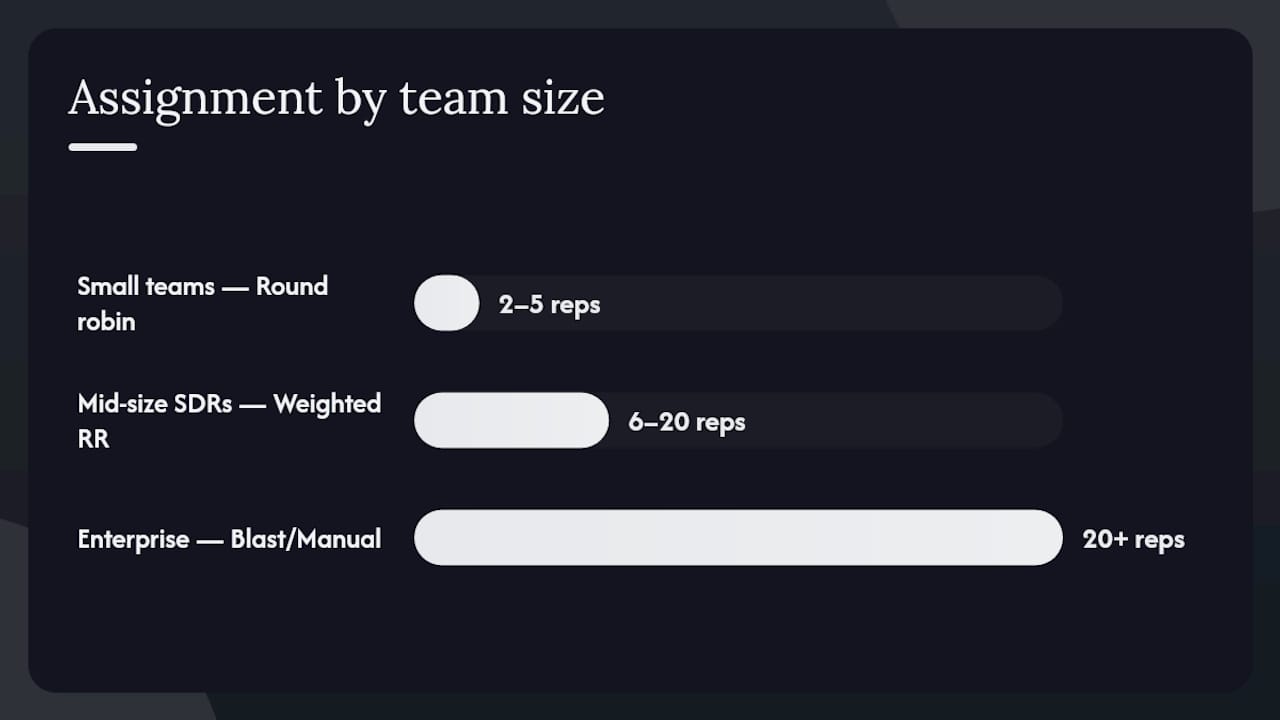
Round robin, next-up, blast/claim, and manual pull each solve a different problem. Picking the wrong one for your team size creates either overloaded reps or leads sitting unclaimed.
Definitions
User vs. queue: the resilience question
Routing directly to a user is the simplest path, but it creates a single point of failure. A rep on PTO, a rep who just quit, or a rep whose capacity is already maxed all produce the same outcome: an unworked lead. Route only qualified leads into the distribution logic and use queues as the assignment destination whenever your team has more than a handful of reps.
When to use each method
Pro Tip: Unweighted round robin can overwhelm a ramping rep who’s still building their pipeline. Assign a capacity weight of 0.5 to any rep in their first 60 days so they receive half the standard volume until they’re fully productive.
The most common routing failure isn’t a missing rule. It’s a rule that matches too broadly, or one that silently matches nothing because a field value was entered inconsistently.
Fields that make reliable criteria
Prefer fields with controlled values over free-text fields:
Avoid free-text fields like “Title” or “Description” as primary criteria. They’re inconsistent and break silently.
Normalization rules
| Field | Anti-pattern | Safe pattern |
|---|---|---|
| Country | “US”, “USA”, “United States”, “united states” | Single picklist value: “United States” |
| Email domain | Mixed case (“Gmail.com”, “gmail.com”) | Lowercase formula field |
| Employee count | Raw integer with no bands | Banded picklist with employee count bands |
| Industry | “SaaS”, “Software”, “Tech”, “IT” | Collapsed to “Software” |
Anti-patterns to avoid
For lead scoring and segmentation that feeds clean data into routing criteria, the scoring model needs to output to a controlled field, not a free-text note.
Rule order is where most admins make their first mistake. The principle is simple: specific rules go first, general rules go last, and the catch-all is always the final entry.
Why order matters
CRM assignment rule engines evaluate entries top-to-bottom and stop at the first match. If a general rule sits above a specific one, the general rule wins every time, and the specific rule never fires.
The correct sequence
Numbering example
010 - OWN_AccountMatch_ExistingOwner
020 - ENT_US_Software_200plus
030 - SMB_US_AllIndustries
040 - INTL_EMEA_AllSegments
999 - FALLBACK_UnmatchedLeads
Leaving gaps between numbers (10, 20, 30) means you can insert a new rule at position 25 without renumbering everything. The 999 fallback number makes it visually obvious that it’s last.
Real talk: undocumented logic is the single biggest long-term failure mode in routing. Write the plain-language version of your rule order in a shared doc and update it every time you change a rule entry.
Testing is where most admins cut corners and then spend three weeks troubleshooting in production. Don’t do that.
Build a test matrix first
One test case per rule entry, plus negative tests for blank fields and edge cases:
Step-by-step manual test
Web-to-lead and form submission tests
Web form submissions typically trigger assignment rules automatically on record creation. Submit a test form with values matching each rule entry and confirm the owner field on the resulting lead record. Don’t assume the form submission path behaves identically to manual creation — test both.
Pro Tip: Save your test matrix as a shared spreadsheet and re-run it after every rule change. A five-minute regression check prevents a three-week production incident.
Design routing tests for each rule path and include both positive matches and negative cases like blank fields. Log each outcome in the test matrix before marking a rule entry as production-ready.
Once routing is live, the work shifts from building to watching. Most routing failures are silent: leads land on the wrong owner, no one notices, and the lead ages out.
What to log on every lead record
Routing_Status__c: values like “Routed,” “Fallback,” “Error,” “Manual Override”Routing_Rule_Key__c: the entry name that matched (e.g., ENT_US_Software_200plus)Routing_Error__c: free text for failure reasons when status = “Error”Quick troubleshooting checklist
When a lead routes incorrectly, run through this in order:
Common failure modes
| Failure | Root cause | Fix |
|---|---|---|
| Lead lands on system admin | No fallback entry; Default Lead Owner is an admin | Create fallback queue; update Default Lead Owner |
| Rule never fires on manual creation | Checkbox missing from layout or unchecked | Add checkbox to layout; check it by default |
| Wrong rep gets lead | General rule above specific rule | Reorder entries; specific rules first |
| Lead owned by inactive user | Rep departed; no cleanup process | Run ownership audit; reassign to queue |
| Routing status field blank | Audit fields not populated | Add Flow to write status on assignment |
Common routing failures trace to rule conflicts, missing data fields, absent fallback logic, and stale ownership records after turnover. A monthly ownership audit catches most of these before they compound.
Alert setup: build a simple report filtered on Routing_Status__c = "Fallback" or Owner = [Fallback Queue] with a count of leads older than 24 hours. Schedule it to email your ops team every morning. That single report surfaces the majority of routing problems before a rep or manager notices them manually.
Track time-to-first-contact, percent routed to fallback queue, and leads owned by inactive users as your three core routing health metrics. These make SLA enforcement possible and surface problem areas by rep or segment.
Routing logic that worked in January breaks by April when territories shift, reps leave, and new product lines launch. Governance is what keeps it working.
Audit cadence
Change control
Runbook for on-call routing issues
When a routing incident is reported:
Routing_Status__c field on the affected lead.Dashboard metrics to track
Both platforms support native assignment rules, but each has hard limits that push complex logic toward declarative automation or code.
Salesforce
Salesforce supports only one active lead assignment rule per org. All your logic lives inside that one rule as ordered entries. The “Assign using active assignment rule” checkbox must be present on the lead layout and checked for the rule to fire on manually created leads. Web-to-lead submissions trigger the rule automatically.
When to stay with native assignment rules:
When to escalate to Flow:
When to escalate to Apex:
Dynamics 365
Dynamics 365 supports assignment rules and dynamic matching for straightforward field-based routing. Dynamic matching lets you map lead field values to system user attributes (territory, language, product specialty) without hardcoding rep names into rules.
Use server-side workflows or plugins when:
When to escalate to engineering
File a RevOps or engineering ticket when:
| Scenario | Salesforce tool | Dynamics 365 tool |
|---|---|---|
| Simple field match | Native assignment rule | Assignment rule |
| Account-owner preservation | Flow (before-save) | Server-side workflow |
| Locked round-robin | Apex (with locking) | Plugin |
| Related-record lookup | Flow or Apex | Plugin |
| Working-hours routing | Flow | Server-side workflow |
Run this checklist in 30–60 minutes to validate any routing setup:
30-minute ops checklist
Routing_Status__c, Routing_Rule_Key__c) are populated after each test.The mistakes we see most often
Remediation snippets
SELECT Id, OwnerId FROM Lead WHERE Owner.IsActive = false) and bulk-reassign results to the fallback queue.Routing_Rule_Key__c and Routing_Status__c.For a broader look at fixing classic sales ops mistakes that compound routing failures, the patterns above show up repeatedly across teams of all sizes.
Real talk: most teams can build a working routing setup in-house. But there are clear signals that external help pays for itself quickly.
Decision triggers
What a short engagement delivers
A focused routing audit and rebuild typically produces:
Cost-benefit framing
A routing engagement is usually a fixed-scope project lasting two to four weeks. The alternative is weeks of manual reassignment, rep frustration, and leads that age out before anyone works them. For most B2B tech teams, a single recovered deal covers the engagement cost.
The lead qualification process upstream of routing also matters: if unqualified leads flood the distribution logic, even perfect routing rules can’t save your speed-to-lead metrics.
Routing failures cost real pipeline. Saleslabelconsulting runs a focused routing audit that maps your current logic, identifies every failure point, and rebuilds the ruleset with a documented plain-language spec, a full test matrix, and fail-safe fallback design. You get a 30-day remediation plan with named owners and an audit cadence, not a slide deck.
The engagement is fixed-scope and typically completes in two to four weeks. Deliverables include the routing logic document, production-safe automation, and a governance runbook your team can operate without outside help afterward. If you’re also dealing with broader sales process gaps that routing alone won’t fix, that’s a natural next conversation. Book a discovery call at Saleslabelconsulting to scope the work.
Subscribe to our Insights: Expert productivity tips in your inbox
You'll receive 1-3 emails per month. Your data stays private, always.

CRO & Co-Founder with Sales Label Consulting

Watch our Sales Mates Podcast
August 10, 2026 - 10 min read
Read article Read articleAugust 8, 2026 - 12 min read
Read article Read articleAugust 7, 2026 - 13 min read
Read article Read articleAugust 6, 2026 - 10 min read
Read article Read article