
90 Day Revenue Playbook for Sales Leaders: Sales Content Management
Sales content management is the discipline of centralizing, governing, and surfacing every asset your reps used to sell, so the right deck, one-pager, or battle card shows up automatically inside their workflow instead of buried in someone’s downloads folder. Done right, it cuts rep prep time, keeps buyers hearing one consistent story, and gives leadership a real number for how content moves deals. This guide covers the features that matter, a copy-ready way to organize assets, governance rules that keep the library honest, and how to measure whether any of it worked.
TL;DR:
- Most successful sales content platforms must excel in search, AI recommendations, governance, revenue-linked analytics, and workflow integration to reduce clutter and stale assets.
- Organizing assets with a small set of fields such as type, deal stage, persona, product, owner, and status, linked directly to CRM opportunities, significantly improves findability and workflow efficiency.
- Clear ownership, quarterly reviews, and a strict expiry and archiving process are essential to prevent content decay and ensure assets stay current and compliant.
- Key KPIs for sales content include adoption rates, time saved, and the percentage of deals influenced by governed assets, not just download counts or subjective impressions.
- Successful implementation hinges on a 90-day phased rollout starting with audits, building structured taxonomy, and activating training with champions, rather than trying to create a perfect system upfront.
Sales content management (often shortened to SCM) is the system of record and workflow that governs how sellable content gets personalized, approved, and delivered to a prospect. That’s a narrower job than a digital asset manager. A DAM stores raw brand files, logos, templates, and images. Sales content management software governs the document workflow around that content, including personalization, compliance, and delivery for proposals, contracts, and pitch decks. Confusing the two is why a lot of enablement rollouts stall: teams buy a file library when what they actually needed was a governance layer.
Without SCM, three things go wrong on repeat. Reps burn hours hunting for the right asset instead of talking to prospects. Messaging drifts because every seller builds their own version of the pitch. Stale collateral, old pricing, retired logos, dead case studies, keeps circulating because nobody owns retirement.
Fix those three problems and the outcomes show up fast:
Ignore the vendor logos for a second and look at the capability categories. Every serious platform needs to do five jobs well, and most gaps show up in one of these five buckets.
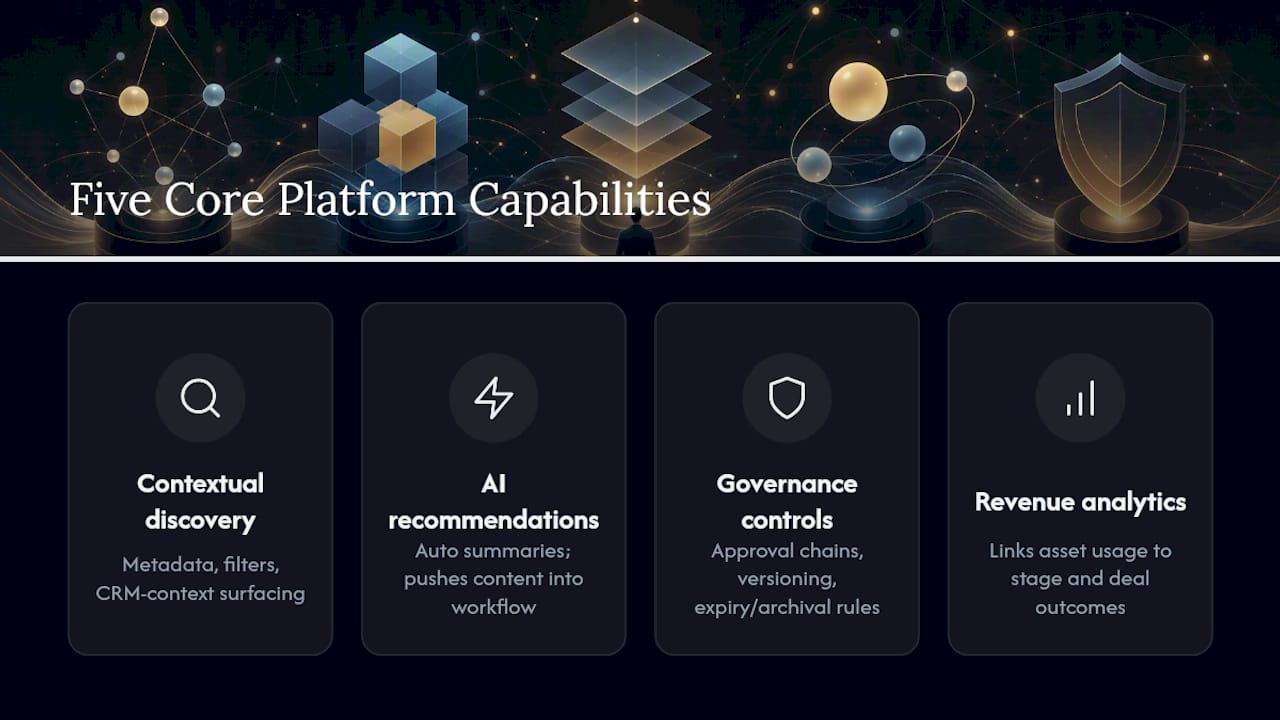
Search and contextual discovery. Metadata, filters, and CRM-context surfacing mean a rep opens an opportunity and the system already knows what stage, persona, and product are in play, so it recommends the right asset without a search bar at all.
AI-assisted recommendations. Vendor platforms increasingly emphasize AI-assisted governance and contextual surfacing that pushes the right piece of content into a seller’s workflow at the right moment, often with an auto-generated summary so the rep doesn’t have to skim a 40-slide deck two minutes before a call.
Governance controls. Approval chains, version control, and expiry or archival rules stop outdated collateral from circulating in the first place.
Analytics tied to revenue. The system should connect asset usage to opportunity stage and, ideally, to won or lost outcomes, not just track downloads.
Integration surfaces. CRM, email, video conferencing, and productivity tools need to carry content into the rep’s actual workflow rather than force a separate login.
Statistic to remember: platforms that build dedicated content hubs around persona-specific playbooks report faster rep execution and reduced manual assembly time, which is the entire point of automating the lifecycle instead of managing it by hand in a shared drive.
Structure beats heroics here. You don’t need exhaustive metadata. You need a small, well-curated set of fields that every asset gets tagged with the day it’s created, not six months later when someone finally audits the drive.
A lightweight asset table, the kind you can build in a spreadsheet or a tool like Airtable’s sales asset management template, gives you a single source of truth with fields for type, product, market, owner, and status. That single source of truth beats five disconnected drives every time.
Six fields to get right from day one:
Build filtered views on top of that table for each role: an SDR view, an AE view, a partner view. A well-structured asset table should make the most common rep workflows one or two clicks away, which means linking every asset directly to the CRM opportunity record it supports, not just to a folder name.
Somebody has to own every asset. Not “marketing” in the abstract, an actual named person whose job includes deciding when a deck gets retired. Skip this step and your library rots quietly for a year before anyone notices the pricing slide is wrong.
Here’s the cadence that works for most B2B teams:
AI can help flag content decay, surfacing assets nobody has opened in 90 days or highlighting when a linked product page changes, but the final call still belongs to a human owner. AI governance works best when paired with clear ownership and a set review cadence; the algorithm flags decay, the owner makes the decision.
Pro Tip: Build a “kill list” review into every quarterly business meeting. Ask one question: which three assets haven’t been touched in 90 days? Retire them on the spot instead of letting the list grow.
Start with adoption, not revenue. If reps aren’t using the library, nothing downstream matters. Track how many active reps log in weekly, how many searches return zero results (a sign your taxonomy has gaps), and which assets get opened but never shared externally.
Once adoption is healthy, move to influence metrics: which assets get attached to opportunities that eventually close, and at what rate compared to opportunities where no tracked asset was used. That comparison is where you start building a real content-to-revenue story instead of a vanity download count.
The metrics that matter to leadership boil down to three:
Analyst guidance backs this up directly: connecting content to performance metrics and clarifying who owns what is what makes content a measurable contributor to revenue rather than a cost center nobody can defend in a budget review. Run small pilot cohorts, half your team gets the new battle card, half doesn’t, and compare win rates over a quarter before rolling anything out company-wide.
Don’t try to build the perfect system on day one. Sequence it.
Change management makes or breaks this phase. Send a short launch email explaining what’s changing and why, tie a small incentive (recognition, a leaderboard, whatever fits your culture) to early adoption, and check in with your champions weekly for the first month. Documenting the plan itself, not just the content, is one of the more underrated levers here. Teams that document their sales best practices alongside their asset library see faster adoption because reps aren’t guessing at intent.
Real talk: most sales content problems aren’t tooling problems. They’re ownership problems wearing a tooling costume.
In engagements with tech companies like AIMPROSOFT and CODEIT, the pattern showed up almost identically. Reps had access to plenty of content, decks, one-pagers, case studies, but no consistent view of which version was current or who to ask when something looked outdated. The fix wasn’t a new platform. It was:
The common obstacle across both engagements was the same: nobody had ever sat down and decided who was accountable for keeping content current. Once ownership was assigned and a review cadence went live, reps stopped rebuilding their own versions of decks from scratch, which had been quietly eating hours every week.
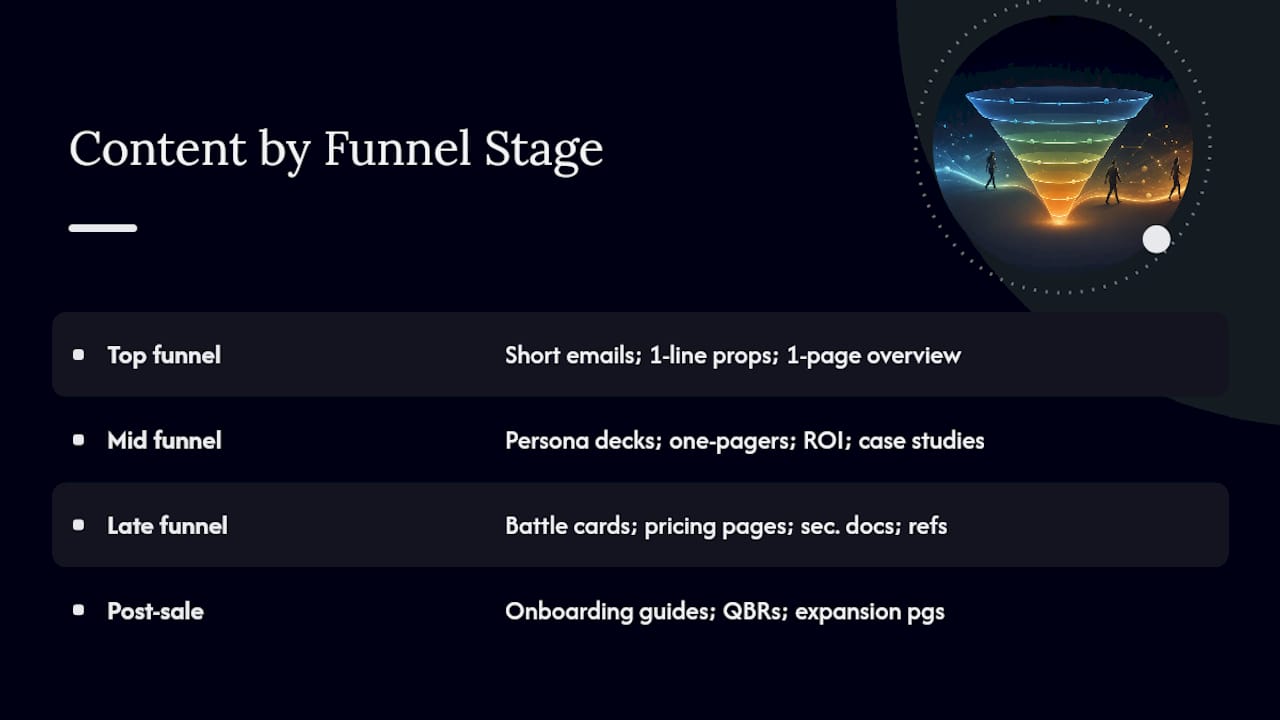
Different roles need different ammunition, and the funnel stage dictates the format more than most teams realize.
Top of funnel (SDRs, prospecting): short email templates, one-line value props, and a single-page company overview. Nobody’s reading a 30-slide deck cold.
Mid funnel (AEs, discovery to evaluation): pitch decks tailored by persona, product one-pagers, ROI calculators, and case studies matched to the prospect’s industry.
Late funnel (AEs, negotiation and procurement): battle cards for competitive objections, pricing one-pagers, security and compliance documentation, and reference customer lists.
Post-sale (Customer Success): onboarding guides, quarterly business review templates, and expansion one-pagers that reuse the same product messaging without contradicting what the AE promised during the sale.
Battle cards deserve special attention because they’re the asset most likely to go stale without anyone noticing. A competitor ships a new feature, and the battle card built six months ago is now handing your rep outdated objection handling. Tie battle card review to competitive intelligence updates, not just the standard quarterly cadence, or you’ll lose deals to information your own library still thinks is true.
Email templates need the same discipline. A cold outreach template that references last year’s pricing or a discontinued product line does more damage than no template at all, because it makes the rep look uninformed the moment a prospect pushes back.
Adoption fails for one predictable reason: the new system asks reps to change behavior before it proves it saves them time. Fix that order and adoption follows.
Start training with the highest-friction moment in a rep’s week, usually building a custom deck for a specific prospect, and show them how the system does it faster. Skip the full platform tour. Nobody remembers 40 features from a single onboarding session.
Name champions on each team, one or two reps who get early access and extra training, then let them answer peer questions instead of routing everything through enablement. Peer credibility moves faster than a top-down mandate ever will.
Build usage into existing rituals instead of creating a new one. If your team already does a Monday pipeline review, add a 90-second segment where a rep shows which asset helped move a deal forward that week. That’s cheap reinforcement that doesn’t require a new meeting on the calendar.
Finally, kill the old way. If reps can still pull decks from a shared drive that isn’t governed, they will, because old habits are the path of least resistance. Sunset the legacy folder on a hard date, not a soft suggestion, once the new system is live and populated.
The sales-content disconnect Forrester describes almost always traces back to marketing producing content in isolation from what reps actually say on live calls. Fixing it means building a feedback loop, not just a handoff.
Set a recurring session, biweekly works for most teams, where a rep or two sits with marketing and enablement to review what’s actually landing in real conversations. Bring call recordings or specific objections from the past two weeks instead of general impressions; specifics change what gets built next.
Give sales a lightweight way to request new content or flag something as outdated, a simple form tied directly into the asset table works fine, so requests don’t get lost in a Slack channel nobody monitors. Enablement’s job is to triage those requests and route them to marketing with context, not to build everything itself.
Rotate ownership of specific asset categories, battle cards to product marketing, top-of-funnel emails to demand generation, so accountability doesn’t collapse into one overloaded team. A strategic approach to content enablement that treats sales input as a required input, not an afterthought, closes the gap between what gets produced and what reps can actually use on a call.
Usage analytics only matter if someone acts on them monthly, not annually. An asset that gets opened constantly but never shared externally is telling you something: reps trust it as internal reference material but don’t trust it in front of a buyer. Investigate before assuming it’s a win.
Build a short feedback loop directly into the CRM workflow, a one-click “this helped” or “this didn’t land” tag after a rep uses an asset in a live deal. It’s blunt, but blunt feedback beats a quarterly survey nobody fills out.
Watch for search terms that return zero results. That gap tells you exactly what content to build next, because reps are actively looking for something that doesn’t exist yet in your library.
Run small experiments before a full rebuild. If you suspect a battle card is underperforming, test a revised version with half your team for a month and compare win rates before rolling it out everywhere. That’s a far cheaper way to validate a change than rewriting your entire library on a hunch.
Insist on three things immediately: named ownership for every asset, a quarterly kill list, and one integration that puts content inside the CRM record, not a separate tab. Stop building metadata nobody uses and stop treating content as marketing’s problem alone. If a library can’t show which assets touch closed revenue, it’s not enablement. It’s storage.
— Antony
Here’s the real talk: most teams don’t need another platform demo, they need someone who’s already fixed this mess for companies like theirs. Saleslabelconsulting brings hands-on, field-tested experience rebuilding revenue systems end-to-end, not theory pulled from a slide deck, so the fixes connect your content library to your actual sales roles, pipeline stages, and performance governance instead of sitting as an isolated project nobody maintains after month two.
A typical first engagement starts with a Revenue System Diagnostics pass to find where content, process, and ownership are actually breaking down, then moves into a Sales Workflow Audit and a prioritized roadmap before any Sales Enablement work begins. That sequence matters because building governance on top of a broken workflow just documents the chaos instead of fixing it.
If your content library feels more like a graveyard than a growth engine, book a diagnostic conversation through the services page and find out what a prioritized 90-day pilot could look like for your team.
Sales content management is the system that governs how sellable content gets stored, personalized, approved, and delivered to reps at the right moment. An example: a rep opens a mid-funnel opportunity in their CRM, and the system automatically surfaces the correct persona-specific pitch deck and a battle card for the competitor mentioned in the last call notes, instead of the rep searching a shared drive.
Rather than ranking specific vendors, focus on capability categories: search and contextual discovery, AI-assisted recommendations, governance and version control, revenue-linked analytics, and integration depth with your CRM and productivity tools. Platforms like Highspot and Templafy illustrate how these categories show up in AI-assisted governance features, but the right choice depends on your existing tech stack and rep workflow.
Definitions vary across the industry, and there’s no single canonical “5 C’s” framework tied to sales content specifically. A practical version some enablement teams use informally includes clarity, currency, context, compliance, and consistency, but treat that as a working checklist rather than an established standard.
Pricing varies widely by platform, seat count, and feature depth, so there’s no single industry-standard figure to quote here. If you’re evaluating a consulting-led rollout instead of a standalone platform, current engagement details and scope for Saleslabelconsulting’s services are available on request through the site.
Track adoption first (weekly active users, zero-result searches), then move to influence metrics like the win rate of deals where a governed asset appears in the opportunity timeline versus deals with no tracked asset. Analyst guidance recommends tying content directly to performance metrics so leadership sees a defensible revenue link instead of a download count.
Subscribe to our Insights: Expert productivity tips in your inbox
You'll receive 1-3 emails per month. Your data stays private, always.

CRO & Co-Founder with Sales Label Consulting

Watch our Sales Mates Podcast
September 19, 2026 - 13 min read
Read article Read articleSeptember 18, 2026 - 10 min read
Read article Read articleSeptember 17, 2026 - 16 min read
Read article Read articleSeptember 16, 2026 - 14 min read
Read article Read article