
What Forecast Categories Are and Why They Drive Real Numbers
Forecast categories are the labeled confidence buckets, usually Pipeline, Best Case, Commit, Omitted, and Closed, that tell Sales, RevOps, and Finance which deals count toward which forecast column. They exist to separate two things reps constantly blur together: how far a deal has moved through your process and how likely it actually is to close. Get that separation right and you get a reliable Commit floor plus honest upside modeling. Get it wrong and your forecast is just vibes dressed up in a spreadsheet.
The standard labels you’ll see across most CRMs:
Forecast categories only produce accurate numbers when written behavioral criteria, not rep intuition, determine which deals qualify for Commit or Best Case.
| Point | Details |
|---|---|
| Categories separate stage from confidence | Two deals at the same CRM stage can sit in different forecast categories based on evidence, not progress. |
| Commit needs three conditions | Confirmed budget, an agreed decision date, and a buyer-confirmed next step, all three, every time. |
| Omit prevents silent pipeline distortion | Give reps explicit rules for excluding stale deals instead of letting them vanish unexplained. |
| Track Commit→Closed conversion weekly | This ratio is the clearest signal of whether your Commit standard is actually being enforced. |
| Governance beats tooling | Saleslabelconsulting builds the criteria, CRM setup, and calibration cadence that make categories reliable long term. |
Pipeline covers any qualified opportunity that’s active but hasn’t earned a stronger label yet. It’s the raw material of your forecast, not a prediction.
Best Case means the deal could close this period, but you’re not staking your number on it. Think of it as the upside scenario, the one you mention to your VP with a caveat.
Commit is the floor. These are the deals you’re telling the board will close, full stop.
Omitted (sometimes shown as “Exclude”) removes a deal from the current forecast period entirely, often because timing shifted or the deal stalled. Rework’s forecast category library points out that without clear rules on when Omit gets used, reps quietly disappear deals and your pipeline-health metrics start lying to you.
Closed is self-explanatory: won or lost, done.
Salesforce’s default configuration uses exactly these five categories, and HubSpot’s forecast tool groups deals the same way, letting reps manually reclassify as confidence shifts. Some teams add a “Most Likely” bucket, or rename labels to match internal language. That’s fine. The names matter far less than the behavioral rules sitting behind them, which is where most forecasts actually fall apart.
Here’s the real talk: a category with no behavioral rule attached is just a label a rep picks based on mood. If “Commit” means whatever a rep feels confident about that Tuesday, your forecast is fiction. You need explicit, testable conditions.
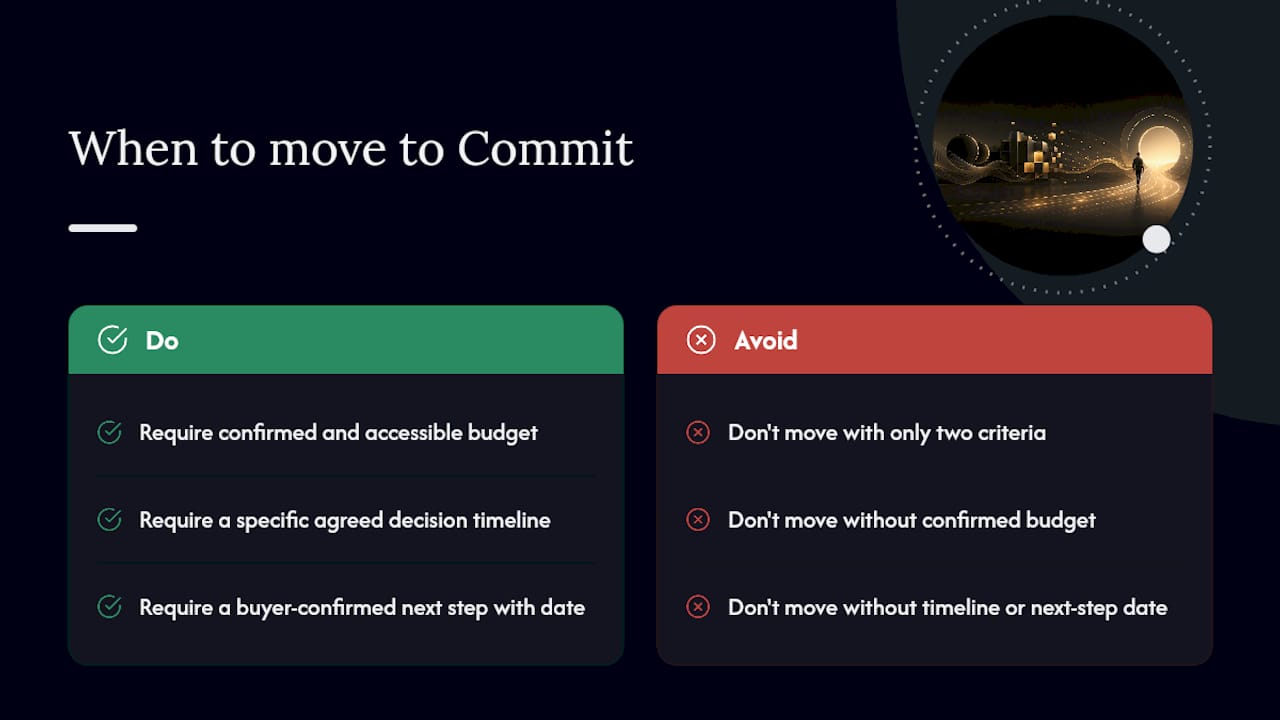
The three-condition Commit standard. A deal only earns Commit when all three are true:
Rework’s guide to the four-category framework backs this exact structure because vague criteria are the single biggest source of forecast inflation. Each condition exists to kill a specific excuse: “they love it” isn’t budget, “soon” isn’t a timeline, and “I’ll follow up” isn’t a next step.
Best Case criteria. A deal qualifies for Best Case when at least one Commit condition is missing but the deal is still active and the buyer has engaged meaningfully in the current cycle. It must never get treated as Commit in a forecast roll-up, even when a rep is “pretty sure.”

Pipeline floor. For a deal to appear in any forecast category at all, it needs a confirmed decision-maker contact, a stated business problem, and activity within your defined recency window (say, 30 days). Anything older gets flagged for Omit review.
Quick dos and don’ts for weekly reviews:
Deal stage tracks progress. Forecast category tracks confidence. Two deals sitting in the exact same “Negotiation” stage can carry completely different forecast categories, one is Commit because legal review is scheduled for Thursday, the other is Best Case because the buyer went quiet two weeks ago. Forecastio’s research on pipeline forecasting makes this point directly: stage alone tells you almost nothing about likelihood.
A simple mapping to adapt to your own process:
| Deal Stage | Typical Forecast Category | Behavioral Trigger |
|---|---|---|
| Early qualification | Pipeline | Contact confirmed, problem stated |
| Demo / evaluation | Pipeline or Best Case | Engagement active, no timeline yet |
| Negotiation | Best Case or Commit | Depends on budget and next-step evidence |
| Legal review | Commit | All three Commit conditions met |
| Closed won/lost | Closed | Contract signed or deal dead |
CRM setup notes. In Salesforce, forecast categories live on the opportunity record and roll up automatically through the standard field mapping; admins can adjust the picklist but should resist adding too many values. HubSpot’s forecast tool lets you assign categories manually per deal, with visibility controls to keep the field from getting lost among other pipeline data. In both systems, lock down picklist governance so reps can’t invent new labels on the fly.
Pro Tip: Add a tooltip or validation rule on the category field that spells out the three Commit conditions right where reps update the opportunity. Embedding the criteria into the workflow stops more forecast inflation than any policy memo ever will.
Your Commit column should function as a floor number, the amount you’re comfortable telling Finance you’ll hit no matter what. Best Case adds upside on top of that, useful for scenario planning but never presented as guaranteed. Pipeline feeds your coverage ratio, typically three to four times quota, which tells you whether there’s enough raw material to hit the number even before you touch confidence.
Metrics worth tracking every week:
For reporting to Finance, present two numbers: a conservative forecast built only from Commit, and a blended scenario that layers in Best Case as clearly labeled upside. Never merge them into one number and call it a forecast. Our guide on improving forecast accuracy walks through building this cadence in more detail. Weekly rep submissions, biweekly manager calibration, and monthly executive roll-ups keep the whole system honest.
Most broken forecasts share the same handful of root causes, and none of them require a new tool to fix.
The fix is almost always subtraction, not addition: tighten the Commit standard, enforce the pipeline floor with automated staleness flags, and give managers explicit override authority during calibration. Add or remove a category label only after a full forecast cycle of data shows it’s genuinely needed, not because one rep asked for more nuance.
Pro Tip: In the rep workshop, run two or three live deal examples and have the room vote on the category before revealing the “correct” answer. Disagreement surfaces exactly where your written criteria are still too loose.
A healthy process typically shows Commit→Closed conversion holding steady quarter over quarter and category accuracy improving as reps internalize the rules rather than guessing.
Most forecast problems aren’t tooling problems, they’re governance problems. A picklist doesn’t fix anything on its own. What fixes forecasts is written behavioral criteria, consistent manager calibration, and the discipline to track Commit conversion honestly over time, even when the number is uncomfortable. That’s the approach we bring into every sales workflow audit we run.
Reading the criteria is one thing. Getting forty reps to apply them consistently, week after week, is a different problem entirely, and it’s the one that actually determines whether your Commit number means anything. Saleslabelconsulting builds the governance layer most RevOps teams skip: written category criteria, CRM configuration that enforces them, and manager calibration routines that catch drift before it hits the board deck.
If your forecast reviews still run on gut feel and hopeful rounding, our sales enablement program is built to fix exactly that, category by category, rep by rep. We also work with partners like XL Roleplay to run forecast-call rehearsals that train managers to challenge weak Commit calls in real time. Book a conversation with us to see where your current categories are leaking accuracy, and what it takes to close the gap.
What’s the difference between forecast categories and sales stages?
Stage tracks how far a deal has progressed through your process. Forecast category tracks how confident you are it will actually close, regardless of stage. A deal can be deep in negotiation and still sit in Best Case if the evidence isn’t there.
How many forecast categories should a sales team use?
Most teams do best with the standard five: Pipeline, Best Case, Commit, Omitted, and Closed. Adding more values usually creates confusion rather than precision.
What should trigger moving a deal into Commit?
Confirmed and accessible budget, a specific agreed decision timeline, and a concrete buyer-confirmed next step with a date. All three, not two out of three.
Can forecast categories be renamed in Salesforce or HubSpot?
Yes, both platforms allow custom labels on the category field. The label itself matters less than whether written behavioral criteria back it up.
How often should managers calibrate forecast categories?
Weekly for individual deal review, with a monthly roll-up to check category accuracy and Commit conversion trends against history.
Subscribe to our Insights: Expert productivity tips in your inbox
You'll receive 1-3 emails per month. Your data stays private, always.

CRO & Co-Founder with Sales Label Consulting

Watch our Sales Mates Podcast
October 24, 2026 - 8 min read
Read article Read articleOctober 23, 2026 - 10 min read
Read article Read articleOctober 22, 2026 - 9 min read
Read article Read articleOctober 21, 2026 - 9 min read
Read article Read article