
12 Step CRM Implementation Roadmap for RevOps With Owners and Durations
A phased CRM implementation roadmap, run through a steering committee with named owners, beats a big-bang launch on speed to ROI and adoption. Small teams can move through the phases in 6 to 10 weeks, mid-market rollouts in 3 to 5 months, and enterprise deployments in 6 to 12 months. Budget a reasonable contingency reserve and allocate a significant portion of the project spend to training. Skip either one and you’re funding the rework instead.
TL;DR:
- Skipping any phase in the CRM implementation process costs more in rework than the time saved, with most projects taking 6 to 12 months for deployment.
- The steering committee should be small, with clear roles assigned via a detailed RACI matrix to prevent scope creep and scope changes after kickoff.
- Data migration often takes longer than planned, so thorough profiling, validation, and testing of source systems are essential before touching production data.
- Prioritize native CRM features over customizations and sequence integrations carefully, testing all in staging environments to avoid delays and data fragmentation.
- Successful adoption depends on investing in training champions first, setting measurable go/no-go criteria early, and providing hypercare support for at least two weeks post-launch.
Most CRM rollouts don’t fail because the software was wrong. They fail because someone skipped a phase to save two weeks and paid for it in month four. A proper CRM deployment plan runs through requirements alignment, planning, configuration, integration, data migration, testing, training, go-live, and post-launch optimization, and skipping any of those phases creates rework that costs more than the time you saved. Here’s the sequence we walk clients through, with owners and durations attached so you can drop it straight into a project plan.
Discovery and goal setting (Owner: Head of Sales or RevOps lead, 1 to 2 weeks). Define three to five measurable success metrics, things like time-to-first-contact, pipeline visibility, or forecast accuracy, and interview stakeholders from sales, marketing, finance, and support. Deliverable: a one-page charter with baseline numbers. Acceptance criteria: every stakeholder signs off on the same metrics.
Steering committee formation (Owner: Executive sponsor, 1 week, runs in parallel with discovery). Name the people, not the departments, who approve budget changes, scope changes, and go-live decisions.
Process mapping and requirements (Owner: RevOps or business analyst, 2 to 3 weeks). Translate actual workflows, not the ones in the employee handbook, into required fields, automations, and reports. Deliverable: a requirements document mapped to system objects.
Vendor and platform fit review (Owner: Project owner with IT input, 1 to 2 weeks). Weigh native functionality against how much custom work you’d need, and check scalability against your headcount plan for the next two years.
Data audit and migration planning (Owner: Data lead, 2 to 4 weeks). Profile every source system, flag duplicates, and build a rollback plan before you touch production data.
Configuration and integration sequencing (Owner: Admin or implementation partner, 3 to 6 weeks). Build the core objects and workflows first; sequence integrations by which ones would hurt the most if they broke.
Testing: unit, integration, end-to-end (Owner: Dev/admin team, 2 to 3 weeks). Each layer gets its own pass/fail criteria before UAT even starts.
User acceptance testing (Owner: Department leads, 1 to 2 weeks). Scripted, role-based test cases with a defined pass threshold, not a vague “does it feel right” check.
Pilot or phased rollout (Owner: Project owner with champions, 2 to 4 weeks). A pilot group of 10 to 20% of users surfaces workflow problems before they hit the whole org, and phased rollouts consistently produce earlier, more visible ROI than big-bang launches.
Cutover and go/no-go (Owner: Steering committee, 1 week). A formal checklist, not a gut feeling, decides whether you flip the switch.
Hypercare (Owner: Project owner plus helpdesk, 2 to 4 weeks post launch). Daily check-ins and a fast escalation path for the inevitable “why doesn’t this field show up” tickets.
Post-launch measurement and Phase 2 backlog (Owner: RevOps, ongoing). Revisit the metrics from step one and groom a backlog of deferred requests every month.
A few things about this sequence that people underestimate:
Pro Tip: Write the go-live checklist before you start configuration, not the week before cutover. It forces you to define “done” early instead of arguing about it under deadline pressure.
If you’re weighing whether to bring in outside help versus running this with internal resources, the deciding factor is usually integration complexity. A single-department CRM with no AI layer and clean data is very doable in-house. Multiple systems, legacy data, and any AI-driven automation is where a revenue architecture audit earns its cost back fast.
Your steering committee should be small enough to make decisions in a single meeting: the executive sponsor, the RevOps or project lead, one sales leader, and one representative each from IT and finance. That’s it. Bigger committees don’t produce better decisions, they produce longer meetings.
A RACI matrix with actual names attached instead of job titles is one of the strongest predictors of a smooth rollout, because “Marketing” doesn’t show up to a decision meeting but Sarah does. Sample breakdown:
Every request that comes in after kickoff, a new field, a different report, an extra automation, runs through a formal change control intake form with three outcomes: approve, defer, or decline. Skipping this governance step is the single biggest driver of scope creep and rework in the projects we’ve reviewed.
Pro Tip: Put a dollar or hour estimate on every change request before the committee votes. “Small tweak” requests routinely balloon once someone actually builds them.
Bad data kills more CRM rollouts than bad software. Start by profiling every source system: how many duplicate contacts, how many blank required fields, how many inconsistent date formats. Assign a named data owner for each source before cleanup begins.
Run a test migration on a representative subset, not the whole database, and validate it with both automated checks and a manual spot-check from someone who actually knows the records. Keeping the old system read-only during validation prevents the classic problem of new records landing in the source you’re about to retire.
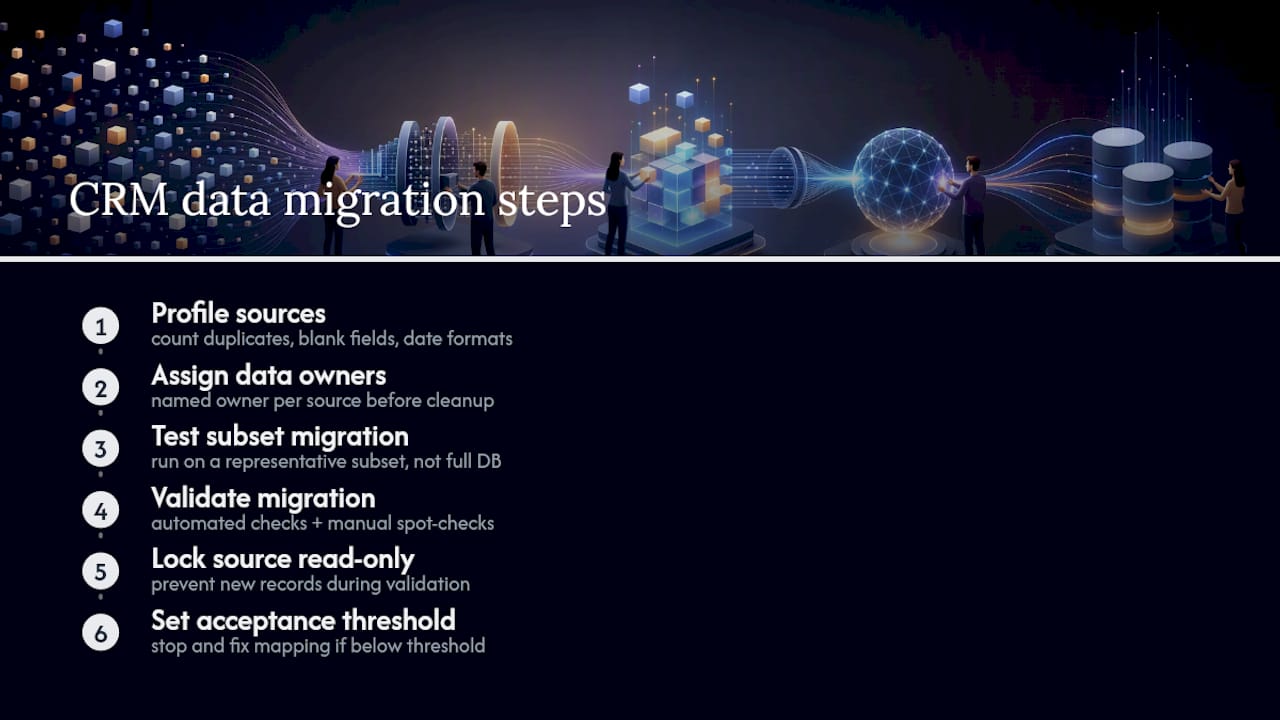
Set your acceptance threshold explicitly. Anything below that, stop and fix the mapping logic before you touch production.
Use native features before you build a single custom field. Every custom field, automation, or workflow should tie to a specific business outcome you can name out loud. If you can’t say why a field exists, don’t build it yet.
Limit your initial build to the fields and automations that support the metrics you defined in discovery. You can always add more once real usage tells you what’s missing. Adding fields nobody asked for is how CRMs end up with 40 unused dropdown options by month six.
This is also the phase where it pays to think a step ahead. If AI-driven lead scoring or agent automation is anywhere on your two-year roadmap, design your object structure and data flows with that in mind now rather than rebuilding it later.
Testing runs in layers, and each layer needs its own owner and its own pass/fail rule.
Testing should cover unit, integration, end-to-end, UAT, and security or performance checks before anyone talks about a launch date. Set your UAT pass threshold at 95% or higher, and use a shared Definition of Done so the dev team and the business side aren’t arguing about what “finished” means.
Training is where most projects quietly underinvest; then wonder why adoption stalls.
Pro Tip: Train managers before you train their teams. A manager who can answer basic CRM questions on the spot prevents dozens of helpdesk tickets in week one.
Adoption problems rarely show up as a training gap on paper. They show up as reps quietly going back to spreadsheets. If that’s already happening on your current system, the root cause is usually process design, not willpower, and it’s worth fixing before you migrate the same bad habits into the new platform.
Go/no-go decisions need hard criteria, not a vibe check from the steering committee.
Once you’re live, run daily hypercare check-ins for the first two weeks, then taper to twice weekly through week four. Every issue gets logged, triaged, and routed: urgent fixes affecting daily workflow get same-day attention, while nice-to-have requests go straight into the Phase 2 backlog instead of derailing hypercare. That triage line is what keeps a support window from turning into an unplanned second implementation.
Go back to the metrics you defined in discovery and check them against the baseline. Time-to-first-contact, conversion rate by stage, and forecast accuracy are the three most CRM leaders track, because they map directly to revenue outcomes rather than vanity usage stats.
Run structured reviews at 30, 60, and 90 days. The 30-day review focuses on stabilization: are people logging in, are critical bugs cleared. The 60-day review looks at behavior: are reps actually working deals in-system instead of around it. The 90-day review ties back to business impact: has pipeline visibility or close rate actually moved.
Enterprise research on adoption gaps shows that governance and training investment early in a rollout correlate strongly with sustained usage months later, while projects that under-invest in those areas see satisfaction drop even when adoption numbers look fine on paper. Watch both metrics, not just login counts.
The failure modes repeat across almost every project we’ve seen: scope creep with no gate to stop it, data migrated without validation, training treated as a one-hour kickoff meeting, and no one owning the decision to go live or wait.
The fix for the first one is a strict change control gate. Every request after kickoff gets categorized as approved, deferred, or declined, with the steering committee making that call, not whoever asks loudest in Slack.
Pro Tip: Build your contingency into the budget as a separate line item, 15 to 25% of total project cost, so it doesn’t quietly get spent on scope creep before you even reach testing.
Most of the roadmap above reflects patterns Saleslabelconsulting sees repeatedly across B2B tech sales teams: the projects that hit their timeline are the ones that treat governance and training as non-negotiable line items, not places to cut when the budget gets tight.
A few tactical notes worth stealing directly:
Governance failures rarely announce themselves. They show up quietly, as three months of “temporary” workarounds that never get fixed because no one owns the decision to fix them.
If your team has clean data, one core system, and no AI layer planned, running this internally is realistic. Once you’re layering in multiple integrations or AI-driven workflows, a structured sales process audit before configuration starts tends to save more time than it costs.
The mistake I see most often isn’t technical. It’s political: nobody wants to be the person who says “we’re not ready to go live” in front of an executive sponsor who’s already told the board a date. That single dynamic causes more rushed cutovers, and more post-launch cleanup, than any data migration error.
The second pattern is training treated as an event instead of a system. A two-hour kickoff session does not build habits. Habits get built through champions, hypercare, and repetition over the first month.
If you fix one thing before anything else, fix the go/no-go criteria. Write them down, in numbers, before you start configuration. Everything else on this roadmap, the RACI, the testing gates, the training budget, exists to protect that one decision point.
— Antony
Running this roadmap solo is doable, but most RevOps leaders don’t have six months of bandwidth to spare on top of their day job, and that’s exactly the gap some consulting firms close. Some consulting firms run scoping sprints, build the RACI with your team, and support pilot rollouts to avoid learning governance and data migration simultaneously with other tasks.
A short consulting engagement typically covers scoping to document requirements, building a working RACI matrix with team roles, and providing support through the pilot phase to avoid common issues for initial users. If your current sales process needs a hard look before you even pick a platform, our sales enablement engagement is the right place to start, and it maps directly onto the discovery and process mapping steps above. Book a scoping call and get a clear plan before you write a single line of configuration.
Subscribe to our Insights: Expert productivity tips in your inbox
You'll receive 1-3 emails per month. Your data stays private, always.

CRO & Co-Founder with Sales Label Consulting

Watch our Sales Mates Podcast
September 10, 2026 - 11 min read
Read article Read articleSeptember 9, 2026 - 9 min read
Read article Read articleSeptember 8, 2026 - 7 min read
Read article Read articleSeptember 7, 2026 - 9 min read
Read article Read article