
Cut Duplicate Rate Below 3%: CRM Data Hygiene for Revenue Leaders
CRM data hygiene is the ongoing discipline of keeping records accurate, complete, and consistent, not a one-time cleanup project. The single highest-leverage move is setting up governance and a maintenance cadence before you touch a single duplicate record. Below is a five-step framework and a cadence checklist to operationalize it.
TL;DR:
- Maintaining a duplicate rate below 3% and an email bounce rate under 2% should be regular priorities to ensure data reliability and improve forecasting.
- Implementing point-of-entry validation, weekly deduplication, and ongoing enrichment for active accounts prevents data decay and enhances decision-making accuracy.
- Routine governance and KPI tracking, such as duplicate and bounce rates, need to be embedded into daily, weekly, and monthly processes for sustainable hygiene.
- Fixing critical fields before enrichment and targeting existing pipeline accounts first yields faster improvements in lead quality and routing accuracy.
- Most CRM problems stem from inconsistent data entry and lack of ownership, making it essential to establish clear rules, automation, and regular audits to prevent decay.
Fixing a CRM doesn’t require a six-month overhaul. It requires picking the right three or four things and doing them every week without fail.
Start here this quarter:
Pro Tip: Track your duplicate rate, bounce rate, and required-field fill rate on a single weekly dashboard. Three numbers, checked every Monday, will tell you more about CRM health than a quarterly audit ever will.
Here’s what “good” looks like on the numbers that matter: a duplicate rate under 3%, an email bounce rate under roughly 2%, and required-field fill rates above 80% on the fields your reps actually rely on for routing and reporting. Hit those thresholds and forecasting gets sharper, outbound deliverability improves, and whatever AI tooling you’re piloting stops learning from garbage. Miss them, and every automation you build just scales the mess faster.
CRM data hygiene means continuously keeping every record in your system accurate, deduplicated, complete, and standardized enough to trust for decisions. That’s a different job from “data cleanup,” which usually means a single sweep to fix a mess that’s already built up. Hygiene is the maintenance program that keeps the mess from forming in the first place.
It’s also distinct from enrichment. Enrichment adds new information to a record, like firmographic data, job titles, or technographic signals. Hygiene comes first: you don’t enrich a record you can’t trust, and you definitely don’t enrich a duplicate. Get the sequence backward and you end up paying enrichment vendors to enhance junk twice.
Why does this need to be continuous rather than periodic? Because contact data doesn’t hold still. Industry estimates put annual CRM contact decay at roughly 22 to 34 percent, driven by job changes, company moves, and email churn. Run a full cleanup in January and by the following January, close to a third of what you fixed has drifted again.
A few distinctions worth keeping straight:
Treat hygiene as infrastructure, not a task on someone’s quarterly OKR list, and it stops decaying at the same rate your data does.
Dirty data doesn’t just annoy your reps. It quietly corrupts every automated decision your revenue engine makes. Lead scoring models trained on incomplete firmographic fields misjudge fit. Territory routing rules assign accounts to the wrong rep because “state” is a free-text field with fourteen spellings of California. Attribution reports credit the wrong channel because UTM parameters never made it past a broken form integration.
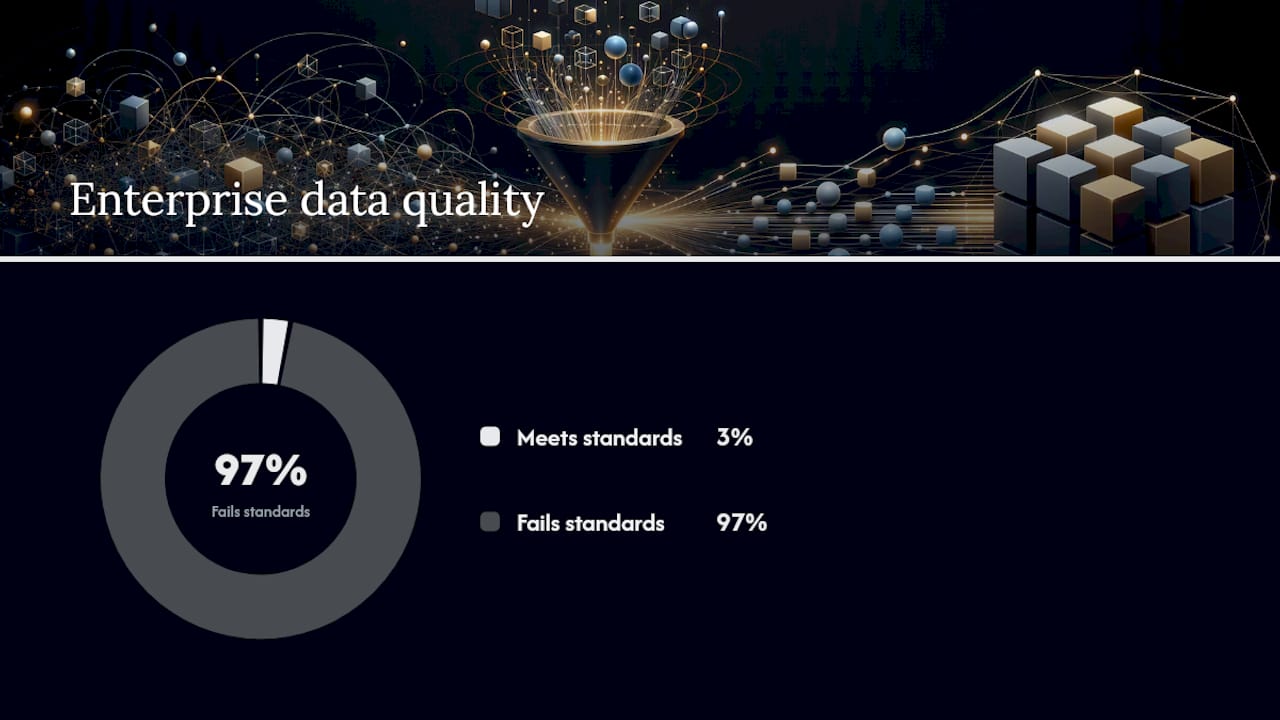
The scale of this problem is bigger than most sales leaders assume. A Harvard Business Review analysis found that only 3% of enterprise data meets basic quality standards across the companies it studied. That’s not a rounding error, it’s a systemic failure most organizations have simply learned to work around.
Here’s where that shows up operationally:
Get your fundamentals right and the payoff shows up in forecasting accuracy and revenue outcomes long before it shows up in a satisfaction survey.
Most CRMs fail in the same handful of predictable ways. Here’s how to spot each one before it costs you a closed deal or a misfired campaign.
Each of these has a distinct root cause, which is why a single “clean the database” initiative rarely fixes more than one or two at a time. Diagnose first, then match the fix to the failure.
Five steps, run in this order, cover the entire lifecycle of CRM data hygiene: define, analyze, purge, enhance, maintain. Skip a step or run them out of sequence and you’re back to firefighting within a quarter.
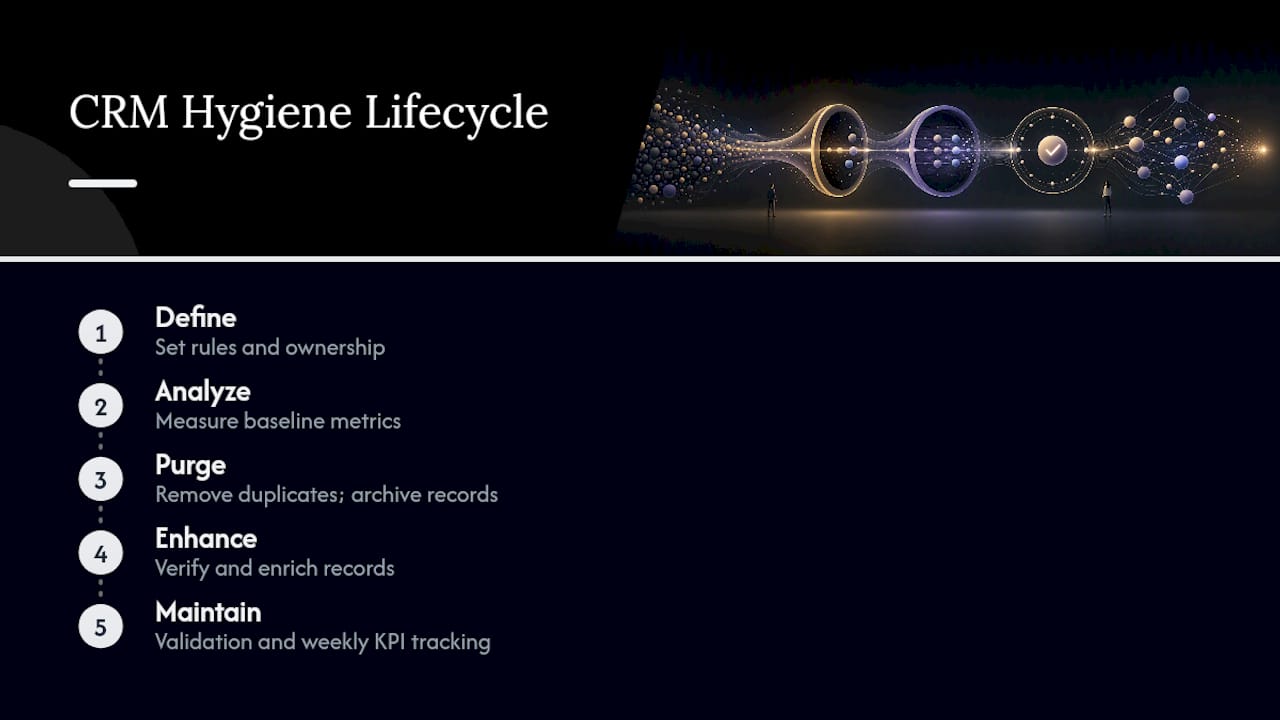
Set the rules before you touch a single record. This means naming a data owner (usually someone in RevOps, not “everyone” or “no one”), documenting required fields per object type, and writing survivorship rules that decide which record wins when two duplicates merge. Gartner’s guidance on data quality puts governance and measurement ahead of tooling for exactly this reason: automation without rules just automates the mess faster.
Baseline where you actually stand before you start fixing anything. Pull your current duplicate rate, required-field completeness percentage, email bounce rate, and enrichment match rate. Write these numbers down. Without a baseline, you can’t prove the cleanup worked, and you definitely can’t justify the budget for the tooling that comes next.
This is deduplication and archival, and it’s the step most teams rush and regret. Use a tiered approach: high-confidence matches (identical email domain, near-identical name) merge automatically; lower-confidence matches route to a human for review before merging. Predefined survivorship rules and match-confidence scoring prevent the kind of irreversible bad merge that erases legitimate activity history. Set clear criteria for what gets archived versus permanently deleted; not every stale record deserves the death penalty.
Verify before you enrich, never the other way around. Run email and phone verification on the record first, then layer on firmographic or technographic enrichment once you know the base record is real. Set a refresh cadence, weekly for active pipeline accounts, monthly or quarterly for the rest of the database, so enrichment doesn’t go stale the moment you finish paying for it.
This is the step that actually determines whether steps one through four were worth doing. Build validation rules directly into the CRM so bad data can’t get created in the first place. Automate what you can (deduplication alerts, bounce detection), but keep a human in the loop for merge approvals and edge cases. Track your three core KPIs weekly, not quarterly, so drift gets caught in days instead of months.
Pro Tip: Require fields at stage transitions instead of at record creation. Asking a rep for ten fields on lead capture kills form completion; asking for two required fields before a deal can move to “proposal sent” enforces the same discipline without the adoption backlash.
Hygiene only survives contact with a busy sales floor if it’s built into a calendar, not a hope. Here’s how the five-step framework breaks down into an operating rhythm.
| Cadence | Tasks | Primary owner |
|---|---|---|
| Daily | Point-of-entry field validation; rep activity logging checks | Sales reps, RevOps automation |
| Weekly | New-record verification; duplicate alert review; bounce list check | RevOps analyst |
| Monthly | Full deduplication pass; enrichment refresh for priority accounts | RevOps / Data owner |
| Quarterly | Governance rule review; required-field audit; KPI trend review | Head of Sales, RevOps lead |
| Annual | Schema cleanup; data model review; governance policy refresh | RevOps lead, IT/Systems |
A few notes worth calling out beyond the table:
If your team can’t commit to the monthly and quarterly rows, don’t skip them silently. Adjust the cadence and document why, so the gap is a decision and not an accident.
Tooling for CRM hygiene splits into four categories, and most teams need pieces of all four rather than one platform that claims to do everything.
When evaluating any tool in these categories, weigh refresh cadence (how often does the underlying data actually update, not just how often the vendor says it does), API coverage for your specific CRM, and verification accuracy on the fields that matter most to your routing logic. Pre-ingest verification paired with scheduled re-enrichment is the pattern that shows up across most practitioner playbooks, and for good reason: it stops the two most expensive mistakes, enriching a duplicate you’re about to merge anyway, and automating a workflow with no governance behind it, so a broken validation rule silently corrupts thousands of records before anyone notices.
Pro Tip: Before buying any dedup tool, ask what happens on a low-confidence match. If the answer is “it merges automatically,” that’s a liability, not a feature.
Practical hygiene work shows up in the pipeline numbers before it shows up in a satisfaction score. A few patterns from Sales Label Consulting engagements illustrate what the framework looks like in practice, not in theory.
One engagement with MergeRocks supported a 60% ARR uplift, driven partly by cleaning up routing logic that had been silently misassigning inbound leads for months, a direct consequence of inconsistent free-text fields feeding the assignment rules. A separate engagement with Habitat produced two new sales-qualified leads within three months, using targeted enrichment refresh on a much smaller, higher-intent account list rather than a blanket database-wide push. Work with CODEIT tied hygiene improvements directly to lead quality, filtering out zombie and duplicate records before they ever reached a rep’s queue.
The pattern across all three: hygiene work paid off fastest when it targeted the specific accounts already in motion, not the entire historical database.
Three steps worth copying regardless of your CRM size:
Most sales leaders overcorrect toward a big cleanup project because it feels like progress. Fund governance and point-of-entry validation first instead. A one-time purge without a maintenance plan behind it buys you maybe two quarters of clean data before decay drags you right back to where you started, and you’ll have spent a real budget line to get there.
Pick three KPIs, duplicate rate, required-field fill rate, bounce rate, and report them weekly, not quarterly. Weekly reporting creates accountability in a way quarterly reviews never will; problems get caught while they’re still small enough to fix in an afternoon. I’d also push back on the instinct to hire an enrichment vendor before governance is in place. Enrichment on top of ungoverned data just means you’re paying more to enhance the same mess, faster.
The uncomfortable truth is that hygiene is boring, and boring work doesn’t get budget approved easily. But the alternative, an AI initiative or automation buildout running on a CRM that’s 30% duplicates, is a far more expensive kind of boring. It just shows up as a missed forecast instead of a line item.
— Antony
Most teams don’t fail at CRM hygiene because they don’t know the framework. They fail because nobody owns it, and the fix keeps losing to whatever fire is burning that week. Effective hygiene management should be part of a structured sales audit rather than a bolt-on IT project, so governance rules and validation logic are built by people who understand how your pipeline and forecasting actually work.

A typical engagement starts with an audit that baselines your duplicate rate, field completeness, and bounce rate, then moves into quick wins (point-of-entry validation, a first deduplication pass) within the first few weeks, before layering in automation and a maintenance cadence your team can actually sustain without a consultant standing over their shoulder. If your forecast has stopped feeling trustworthy, that’s usually where the conversation starts. Take a look at how a sales audit works and get in touch to scope what a hygiene-focused engagement would look like for your pipeline.
For deeper detail on the standards and figures referenced throughout this piece:
Subscribe to our Insights: Expert productivity tips in your inbox
You'll receive 1-3 emails per month. Your data stays private, always.

CRO & Co-Founder with Sales Label Consulting

Watch our Sales Mates Podcast
September 7, 2026 - 9 min read
Read article Read articleSeptember 5, 2026 - 8 min read
Read article Read articleSeptember 4, 2026 - 9 min read
Read article Read articleSeptember 3, 2026 - 9 min read
Read article Read article